VS Code has now a Native Integration of Your Local Models!
LLMs are great! They give me finally the capability to build all my ideas and side projects, which were just too time consuming before! But I don’t just want them to plan my next holiday, or fix my broken Python function… The main aspect which interests me is how to implement LLMs into applications, systems, or scripts. Integrating APIs of top tier AI providers for that is often times an overkill and can get expensive quite fast.
Therefore I chose to pick a hybrid approach! Local models wherever possible, and top tier models as the secret weapon. When I heard that with a recent update, VS Code is now natively supporting Ollama models, I started right away. That is what I’m gonna share with you — set up your local Ollama LLM and integrate it into VS Code.
Ollama Setup
The setup process is very straight forward, just go to the official website https://ollama.com/download and either download it directly, or use the terminal command:
curl -fsSL https://ollama.com/install.sh | shNow start your terminal and check if Ollama is available:
ollama --versionollama version is 0.22.0Qwen3.5 Setup
With Ollama in place, you need a model to serve. Qwen3.5 is a solid choice for general-purpose chat. It needs at least 24 GB of free RAM, ideally 32 GB+ for comfortable use, and around 23 GB of storage. If your machine is not sufficient, use an older or smaller model. Pull the model:
ollama pull qwen3.5:35bpulling manifest
pulling 900dde62fb7e: 100% ▕████████████████████▏ 23 GB
pulling 7339fa418c9a: 100% ▕████████████████████▏ 11 KB
pulling 9371364b27a5: 100% ▕████████████████████▏ 65 B
pulling 606ad9f1ecbc: 100% ▕████████████████████▏ 482 B
verifying sha256 digest
writing manifest
successVerify the model is available:
ollama listNAME ID SIZE MODIFIED
qwen3.5:35b 3460ffeede54 23 GB 13 minutes agoOllama serves locally at port 11434 by default. Give it a quick curl to confirm it’s responding:
curl http://localhost:11434/api/chat \
  -d '{
    "model": "qwen3.5:35b",
    "stream": false,
    "think": false,
    "messages": [{"role": "user", "content": "hi"}]
  }'
{
"model": "qwen3.5:35b",
"created_at": "2026-04-28T18:21:58.46414Z",
"message": {
"role": "assistant",
"content": "Hello! How can I help you today?"
},
"done": true,
"done_reason": "stop",
"total_duration": 8576609958,
"load_duration": 8061604333,
"prompt_eval_count": 13,
"prompt_eval_duration": 167487750,
"eval_count": 10,
"eval_duration": 326964625
}The think: false flag disables the model’s chain-of-thought reasoning. For simple tasks like classification or quick chat, this makes responses way faster. Leave it out (or set to true) when you want the model to actually think things through.
Add your Model to VS Code
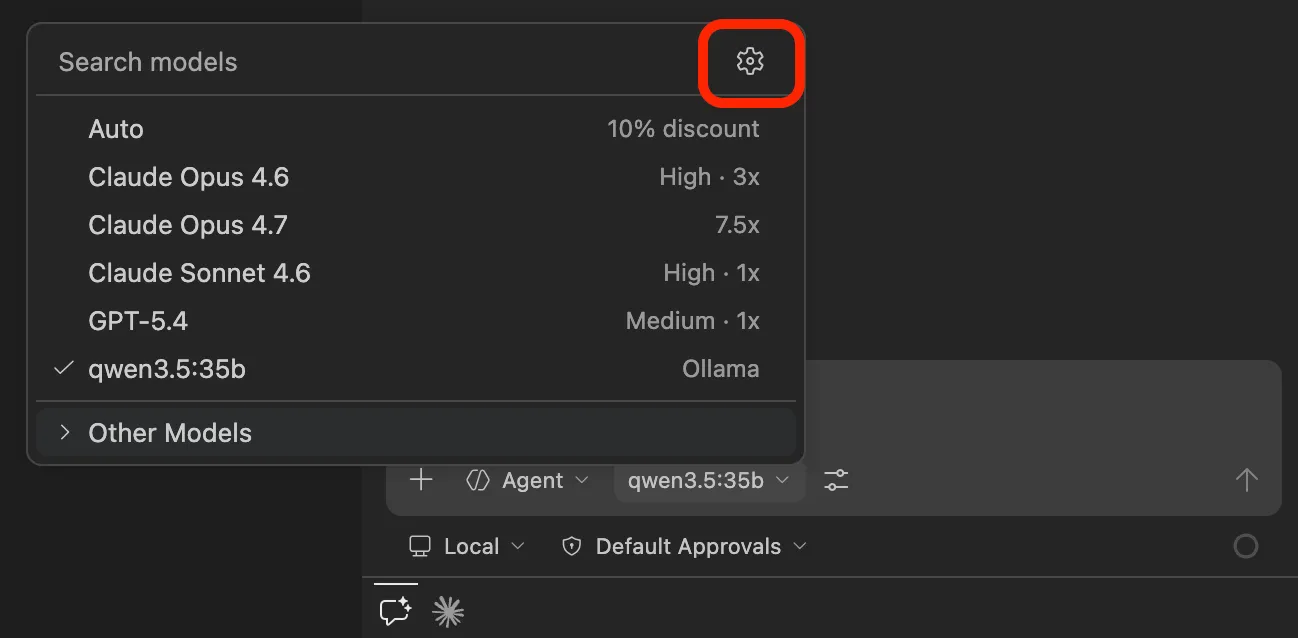
It’s time to upgrade your IDE with a local LLM. Open VS Code and navigate to the GitHub Copilot side panel. Click on the model selection, then on the settings icon in the top right corner:
Right beside the search bar, click “Add Models…” and choose “Ollama”:
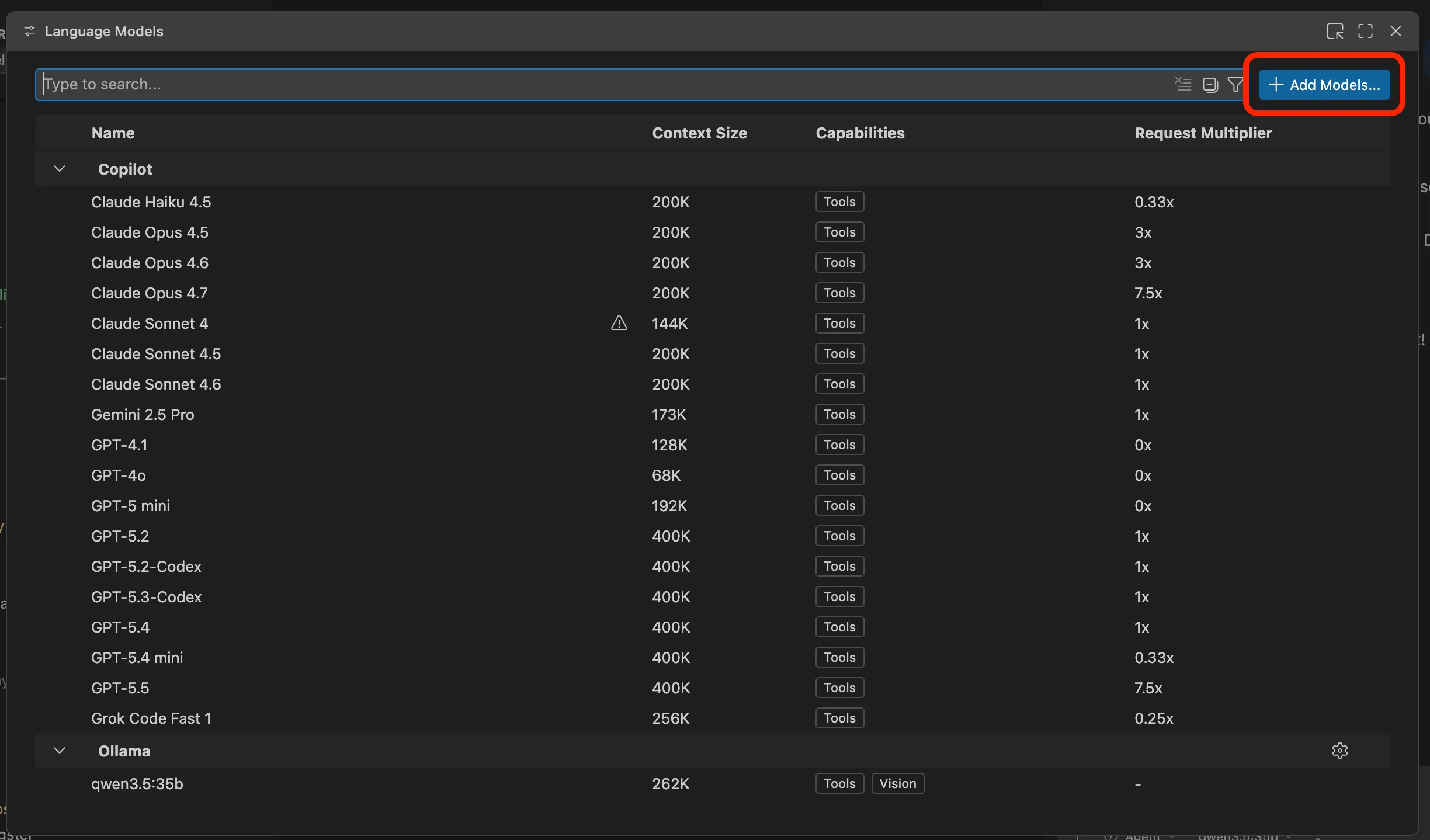
Pick a group name of your choice and hit enter. Then put in the local Ollama serving URL:
http://localhost:11434That’s all you have to do. In the GitHub Copilot model selection dropdown, your Qwen model should now be listed. Give it a try!

Note: For Copilot Agent Mode (where it reads files and runs commands on its own), the model needs to support tool calling. If your model doesn’t show up in the agent picker, that’s why. Qwen3.5 supports tool calling, so you’re good.
That was it! Welcome to the hybrid approach. Don’t waste money prompting simple tasks to top tier LLMs — local models, if used correctly, do the job just fine.
And the best part: Ollama exposes a local API by default. Same model, same machine, powers your Copilot chat AND any automation script you throw at it. No extra setup, no extra config.
Shutting Down Ollama
Once you’re done, free up the memory by stopping Ollama.
macOS (menu bar): Click the Ollama icon in the menu bar → Quit.
Terminal (any OS):
pkill ollamaVerify it’s stopped:
curl http://localhost:11434
# Should return: connection refused
To start it again later:
ollama serve